
Localization doesn’t have to be painful anymore. With the SatoLOC Insight localization module and its API, translating and maintaining a multilingual website can be as routine as running analytics or deploying code.
Localization is still stuck in 2010
Most teams know they should localize their websites. They also know what comes next: export files, email vendors, tickets for engineers, and long review cycles. By the time a new language is live, the source content has already changed twice.
SatoLOC Insight was created around a different assumption: website localization should be an always‑on process, not a one‑off project. It should feel more like syncing data than managing a never‑ending translation spreadsheet.
In this post, we’ll walk through how the SatoLOC Insight localization module + API makes that possible.
The usual localization workflow (and why it breaks)
A typical localization flow usually looks like this:
- Mark pages for translation.
- Export content into files or spreadsheets.
- Send everything to a TMS or vendor.
- Wait for translation and QA.
- Re‑import content into the CMS or codebase.
- Fix issues after customers report them.
This approach has a few predictable problems:
- Content goes out of sync quickly.
- Engineers become the bottleneck for every small change.
- SEO and UX issues are discovered after launch.
- Data about what was translated, changed, or rejected is scattered everywhere.
A traditional TMS can help manage strings and workflows, but it still assumes you’re pushing content in manually. It doesn’t start from the reality of your live website.
Starting from your live website, not a file export
The SatoLOC Insight localization module flips that starting point.
Instead of asking, “Which files should we upload?” you simply provide a URL. The module automatically:
- Extracts your sitemap.
- Crawls the selected pages.
- Prepares all visible content for translation.
This removes the “prep work” phase entirely. You don’t need to manually collect copy, chase down product owners for missing sections, or worry about pages that slipped through the cracks. If it’s on the site, it can be localized.
For teams already using a TMS, this doesn’t replace it; it sits in front of it. You get a clean, structured representation of your live content that can be fed into your existing stack.
Translating in minutes, not weeks
Once pages are discovered, the module can translate them into your target languages in a matter of minutes. You choose the languages; the system handles the rest.
Key advantages of this approach:
- Fast iteration: You can test new markets without committing to a full, manual translation project.
- Instant visibility: You see translated versions of your key pages almost immediately.
- Lower coordination overhead: Marketing, product, and localization teams can focus on reviewing content instead of orchestrating exports.
This is especially powerful for product‑led and growth‑focused teams who want to see if a new geography responds before investing in a big localization program.
AutoLQA: quality checks built into the workflow
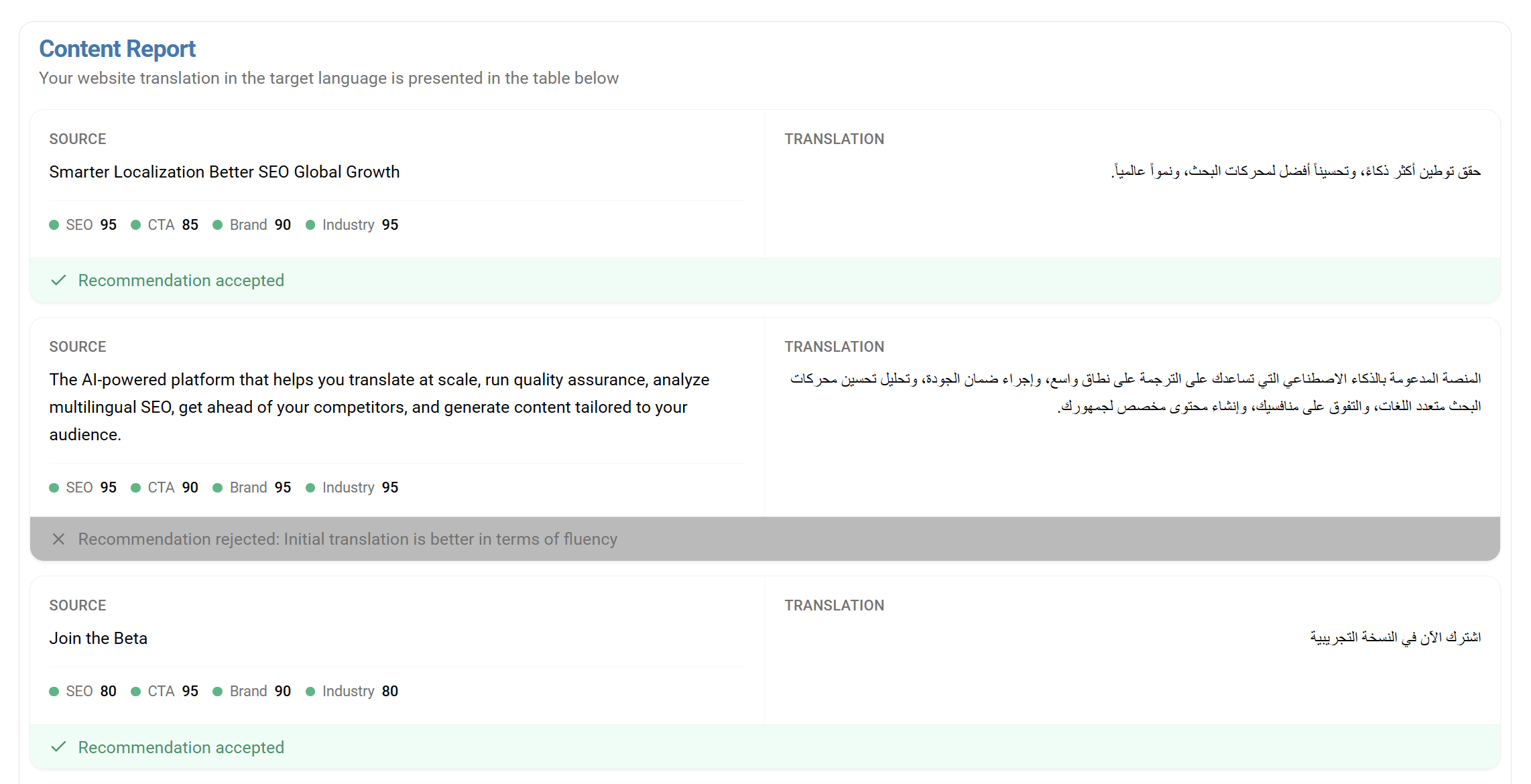
Speed is great, but not if it comes at the cost of quality. That’s where AutoLQA (automatic linguistic quality assurance) comes in.
Instead of handing you raw machine translation and leaving you to manually spot issues, AutoLQA:
- Reviews translations for fluency, clarity, and terminology alignment.
- Suggests improved translations directly in the interface.
- Lets your reviewers accept or reject suggestions in real time.
Over time, the system learns from your decisions. If your team consistently prefers certain phrasing or terminology, future suggestions adapt accordingly.
The result is a review experience that feels closer to “guided editing” than starting from scratch, especially useful for languages where your internal team has limited proficiency.
API support: turning localization into a continuous process
The real leverage comes from the API.
Instead of treating localization as a one‑time project, you can plug SatoLOC Insight into your existing tools and workflows so that website translation becomes continuous and automatic:
- Trigger updates whenever new pages are published in your CMS.
- Re‑run translation and AutoLQA when source content changes.
- Sync approved translations back into your CMS, TMS, or deployment pipeline.
- Keep your multilingual sitemap always up to date.
For engineering teams, this means you can treat localization like any other API‑driven integration: configure it once, then let it run in the background. For localization teams, it means they can focus on decisions, not file handling.
Working together with your existing TMS
Many organizations already rely on a TMS, and they don’t want to replace it. They don’t have to.
SatoLOC Insight’s localization module can sit alongside your current stack:
- Use the module to discover pages, generate translations, and run AutoLQA.
- Export everything in CSV or Markdown for easy ingestion into your TMS.
- Use your TMS for complex workflows, vendor management, or in‑context review where needed.
This hybrid approach is often the most realistic: you keep the processes and tools that already work while getting a faster, cleaner way to manage website‑specific localization.
What this looks like in practice
Here’s a simple example workflow a team might use:
- Product marketing publishes a new feature page in English.
- A hook in the CMS calls the SatoLOC Insight API with the page URL.
- The module detects the page, translates it into target languages, and runs AutoLQA.
- Localization reviewers accept or tweak suggestions in the SatoLOC Insight interface.
- Final translations are exported via API or file and synced back to the CMS or TMS.
- Localized versions go live with minimal engineering involvement.
From the outside, it looks like “we added Spanish, Arabic, and German in a day.” Under the hood, it’s just a well‑designed localization module and API doing the heavy lifting.
When SatoLOC Insight makes the most sense
SatoLOC Insight is particularly helpful if:
- Your website changes frequently and translations often lag behind.
- You’re testing new markets and need a fast way to localize key pages.
- You already have a TMS but struggle with website‑specific workflows.
- Your teams are tired of copy‑pasting content into spreadsheets and email threads.
If this sounds familiar, starting from your live site and automating the rest with an API can change how you think about localization entirely.
Localization as infrastructure, not a project
Website localization should not be a special event that derails your roadmap every time you add a language. It should be part of your infrastructure; reliable, automated, and easy to monitor.
By combining automatic sitemap extraction, fast translation, AutoLQA, and API‑driven integration, the SatoLOC Insight localization module moves website localization in that direction. Managing multiple languages becomes a continuous, calm process instead of a stressful project.
If you’re ready to treat localization like a first‑class part of your product stack, not an afterthought, SatoLOC Insight is a good place to start.
Leave a Reply